Updated for Azahar — the modern 3DS emulator replacing Citra.
Use only your own dumps of games you own! Me or Azahar don’t support piracy.
⚠️ Compatibility Notice
- The Japanese version of MH4U can play with EU/US versions except when specific JP-only equipment or items are used.
🧩 Step 1: Get Azahar
Azahar is the current go-to 3DS emulator, created as a merge of PabloMK7’s Citra fork and Lime3DS.
👉 Download from: https://azahar-emu.org
🗃️ Step 2: Install MH4U Game + Update
- Launch Azahar.
- Go to File → Install CIA, and install both the game and update (1.1 for EUR) that you dumped from your 3ds.
💾 Step 3: Apply My Save with DLC
Place the provided save folder into:
Alternatevly export your saves first.
(Citra or Azahar directory)/sdmc/
This contains extra DLC quests in the extdata.
Verify DLC:
- Launch MH4U in Azahar.
- Select DLC from the main menu.
- When prompted, allow it to connect to the internet.
- After SD card check, you should see a list of DLC quests.
Once verified, you can restart the emulation and start playing!
🚀 Cheats for Better Performance + Graphics (EUR version)
📉 Disable Stereoscopic 3D
610572CC 00000000
B10572CC 00000000
00006BA8 010F036E
D2000000 00000000
💡 Disable Bloom
002BC258 E12FFF1E
Dithering (OFF)
610572CC 00000000
B10572CC 00000000
00006BA8 010F036E
D2000000 00000000
⚙️ Framerate Tweaks
60 FPS
D3000000 08000000
00E44330 42700000
D2000000 00000000
Set Stereoscopic 3D mode to off and Depth to 0% under Emulation -> Configure -> Graphics -> Enchancments.
🖼️ HD Textures
- Unzip CustomTextures.zip.
- Place the contents into your Azahar custom textures folder:
Thank you to MH Classic HD Project for all the hard work! Check them out on Discord
(custom_textures_path)/MH4U/
🕹️ My Settings
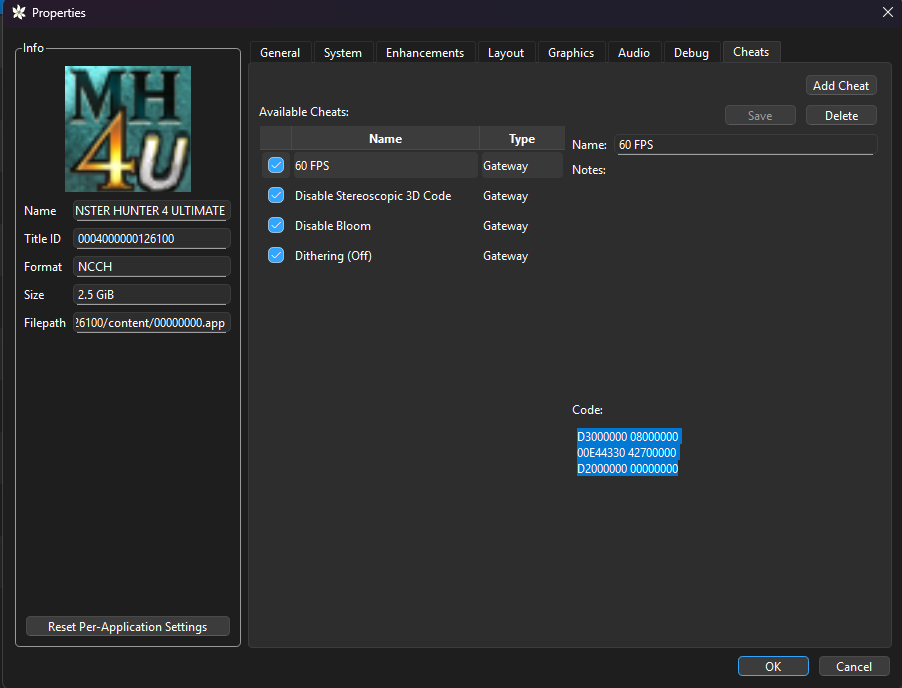
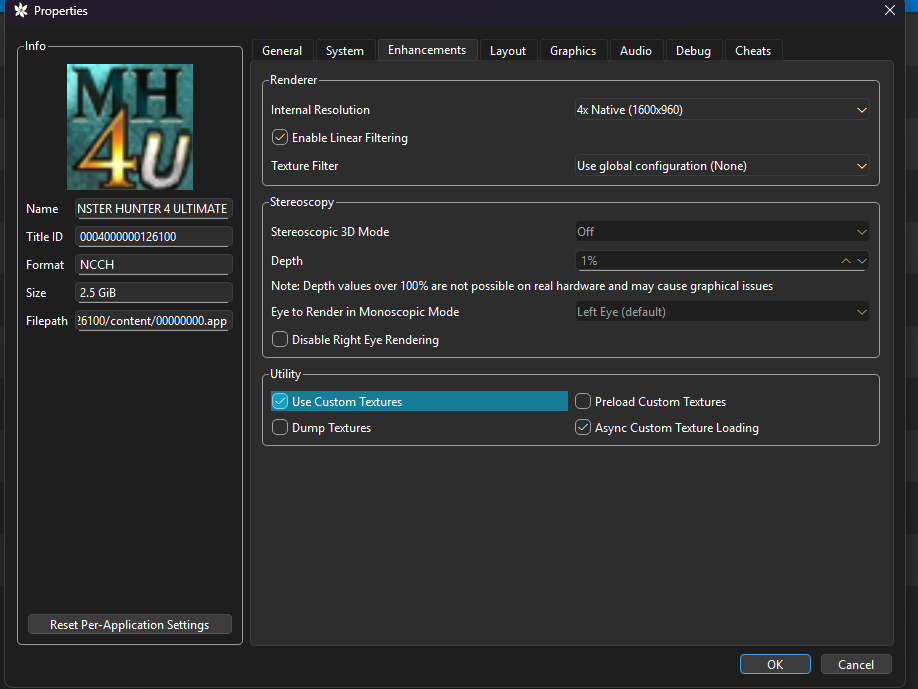
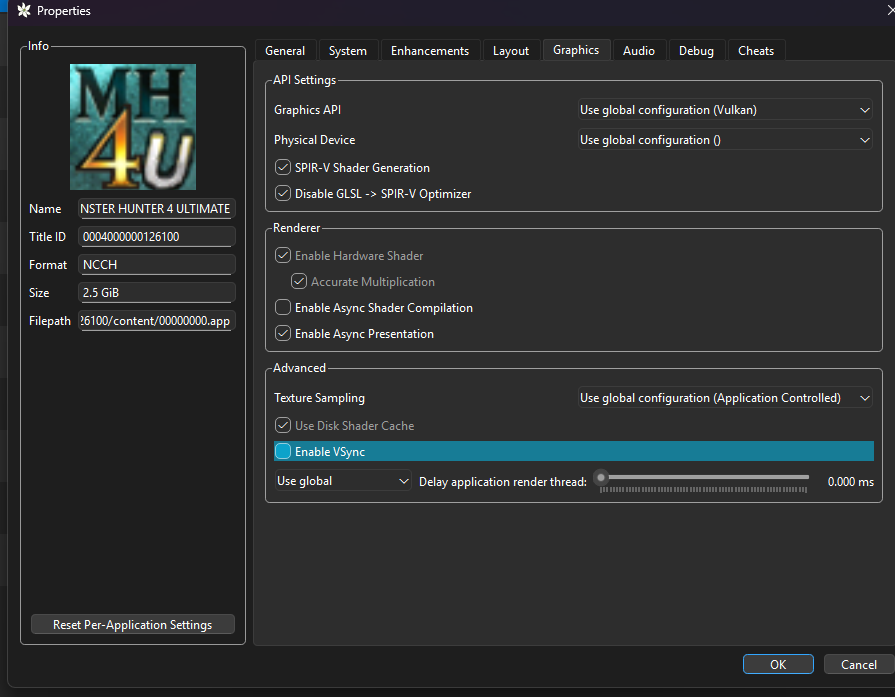
🌐 Multiplayer Setup
🔍 See All Public Lobbies
- Open
qt-config.ini(viaFile → Open Azahar Folder → config). - Change the following:
web_api_url\default=false
web_api_url=http://88.198.47.46:5000
📌 Source: Reddit Thread
🔗 Direct Join a Room
- Use Multiplayer → Direct Connect
Once in, create a Local Hub — others can join from there.
🛑 Importing Saves from 3DS to Azahar
1. Install Custom Firmware (CFW) on Your 3DS
Follow: https://3ds.hacks.guide/get-started.html
⚠️ Risk involved. Research before proceeding.
2. Use Checkpoint to Export Save
- GitHub: Checkpoint
- Export both:
- Main save
- Extra data (includes equipment, quests, titles, etc.)
3. Transfer to PC
- Insert SD card manually
OR - Use FTP server
4. Import to Azahar
- Right-click game in Azahar →
Open Save Data Location - Also open
Extra Data Location - Paste files into respective folders.
🛠️ Alternative Save Method (No 3DS)
Don’t want to risk CFW?
- Create a new character in Azahar.
- Use this save editor:
- Optionally import talismans into Athena’s ASS for MH4U.
⚙️ Optional Settings
🖥️ Use Vulkan for Better Performance
- Before launching a game, click the OpenGL button to switch to Vulkan.
🎮 Analog Stick Setup
- Use Set Analog Stick Button to avoid 8-directional or deadzone issues.
📱 Touch Screen Shortcuts
- Enable Use button mapping
- Click Configure
- Select an area of the touch screen.
- Press a controller button to assign it.
Example:
- Minus = Kick
- Share = Map zoom
- L3/R3 = Potions
🕹️ Circle Pad Pro (Type 4)
- Left Trigger = Open Chat
- Right Trigger = Target Switching
🎁 Bonus Resources
- GodMode9 Guide – Dumping Legit Games & Saves
- Checkpoint – Save Backup/Restore
- Athena’s ASS for Talisman Management
🎯 Conclusion
You’re now fully equipped to play MH4U in high-res, with better performance, full DLC access, and multiplayer support via Azahar.
Happy Hunting! 🐉⚔️
Comments