Monster Hunter 4 Ultimate + Azahar Emulator Guide
Updated for Azahar — the modern 3DS emulator replacing Citra.
Use only your own dumps of games you own! Me or Azahar don't support piracy.
⚠️ Compatibility Notice
- The Japanese version of MH4U can play with EU/US versions except when specific JP-only equipment or items are used.
🧩 Step 1: Get Azahar
Azahar is the current go-to 3DS emulator, created as a merge of PabloMK7’s Citra fork and Lime3DS.
👉 Download from: https://azahar-emu.org
🗃️ Step 2: Install MH4U Game + Update
- Launch Azahar.
- Go to File → Install CIA, and install both the game and update (1.1 for EUR) that you dumped from your 3ds.
💾 Step 3: Apply My Save with DLC
Place the provided save folder into:
Alternatevly export your saves first.
(Citra or Azahar directory)/sdmc/
This contains extra DLC quests in the extdata.
Verify DLC:
- Launch MH4U in Azahar.
- Select DLC from the main menu.
- When prompted, allow it to connect to the internet.
- After SD card check, you should see a list of DLC quests.
Once verified, you can restart the emulation and start playing!
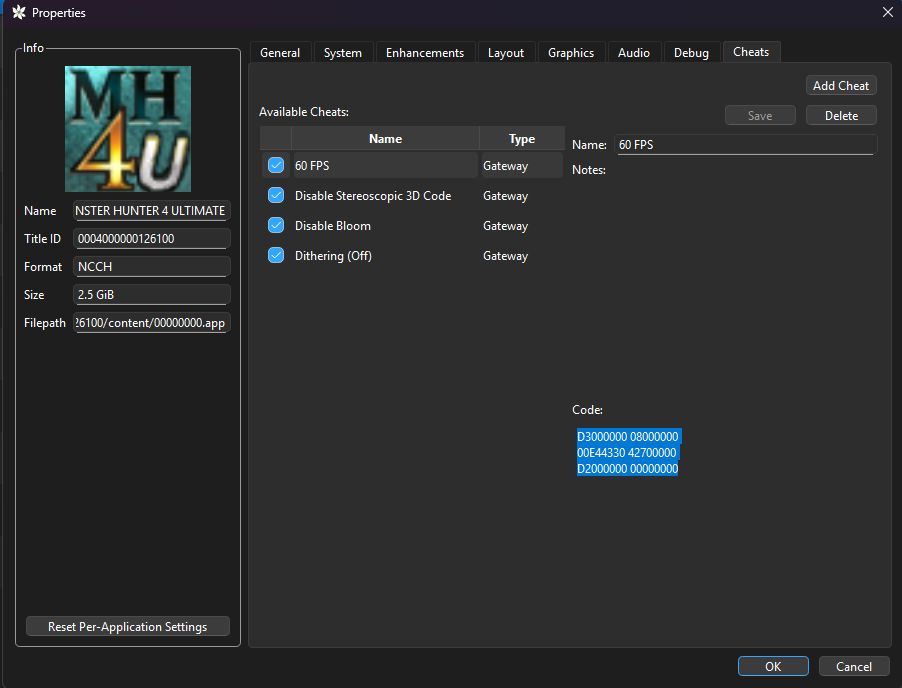
🚀 Cheats for Better Performance + Graphics (EUR version)
📉 Disable Stereoscopic 3D
610572CC 00000000
B10572CC 00000000
00006BA8 010F036E
D2000000 00000000
💡 Disable Bloom
002BC258 E12FFF1E
Dithering (OFF)
610572CC 00000000
B10572CC 00000000
00006BA8 010F036E
D2000000 00000000
⚙️ Framerate Tweaks
60 FPS
D3000000 08000000
00E44330 42700000
D2000000 00000000
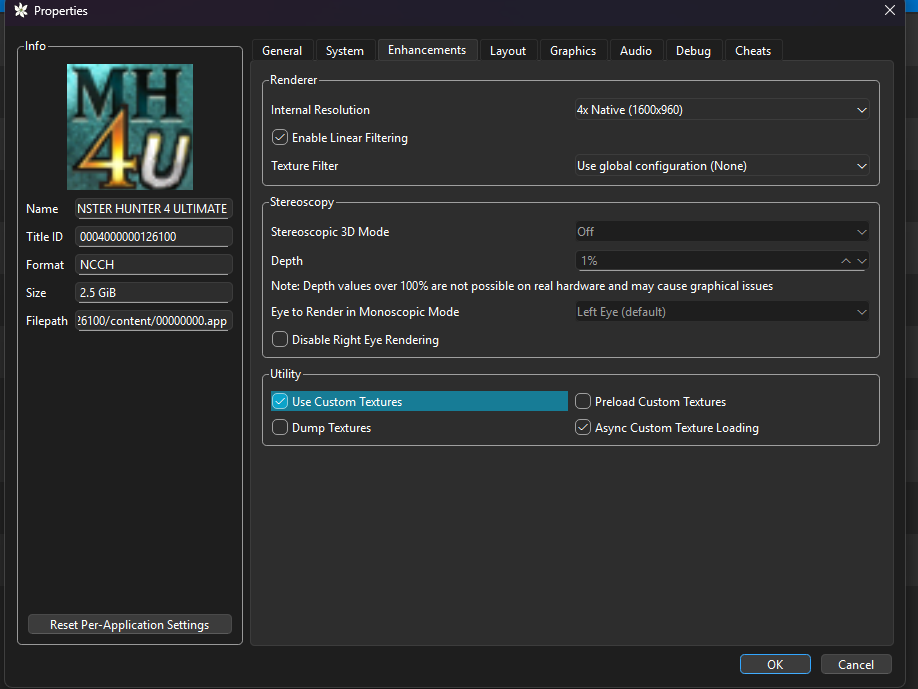
Set Stereoscopic 3D mode to off and Depth to 0% under Emulation -> Configure -> Graphics -> Enchancments.
🖼️ HD Textures
- Unzip CustomTextures.zip.
- Place the contents into your Azahar custom textures folder:
Thank you to MH Classic HD Project for all the hard work! Check them out on Discord
(custom_textures_path)/MH4U/
🕹️ My Settings
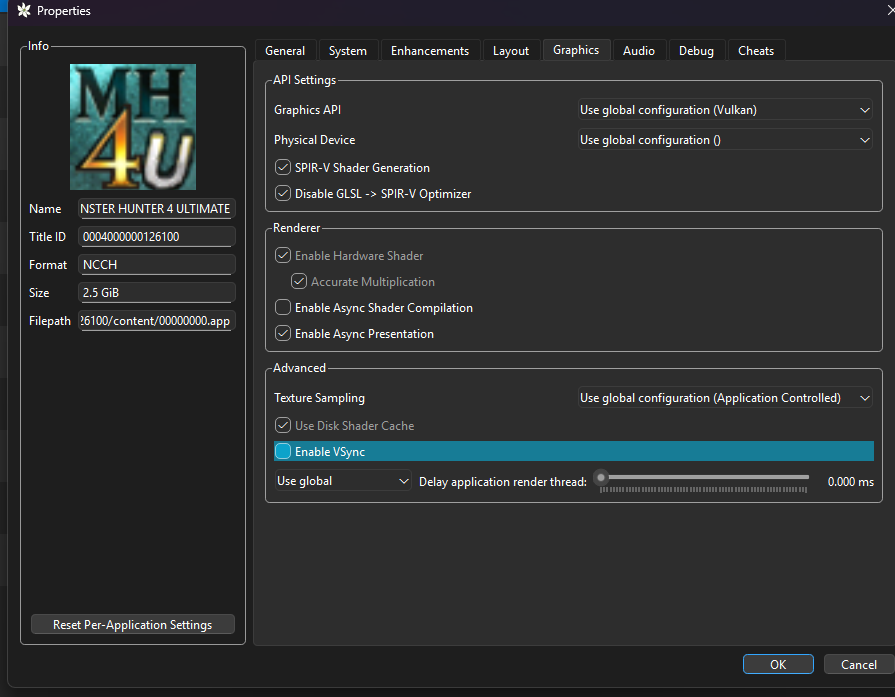
🌐 Multiplayer Setup
🔍 See All Public Lobbies
- Open
qt-config.ini(viaFile → Open Azahar Folder → config). - Change the following:
web_api_url\default=false
web_api_url=http://88.198.47.46:5000
📌 Source: Reddit Thread
🔗 Direct Join a Room
- Use Multiplayer → Direct Connect
Once in, create a Local Hub — others can join from there.
🛑 Importing Saves from 3DS to Azahar
1. Install Custom Firmware (CFW) on Your 3DS
Follow: https://3ds.hacks.guide/get-started.html
⚠️ Risk involved. Research before proceeding.
2. Use Checkpoint to Export Save
- GitHub: Checkpoint
- Export both:
- Main save
- Extra data (includes equipment, quests, titles, etc.)
3. Transfer to PC
- Insert SD card manually
OR - Use FTP server
4. Import to Azahar
- Right-click game in Azahar →
Open Save Data Location - Also open
Extra Data Location - Paste files into respective folders.
🛠️ Alternative Save Method (No 3DS)
Don’t want to risk CFW?
- Create a new character in Azahar.
- Use this save editor:
- Optionally import talismans into Athena’s ASS for MH4U.
⚙️ Optional Settings
🖥️ Use Vulkan for Better Performance
- Before launching a game, click the OpenGL button to switch to Vulkan.
🎮 Analog Stick Setup
- Use Set Analog Stick Button to avoid 8-directional or deadzone issues.
📱 Touch Screen Shortcuts
- Enable Use button mapping
- Click Configure
- Select an area of the touch screen.
- Press a controller button to assign it.
Example:
- Minus = Kick
- Share = Map zoom
- L3/R3 = Potions
🕹️ Circle Pad Pro (Type 4)
- Left Trigger = Open Chat
- Right Trigger = Target Switching
🎁 Bonus Resources
- GodMode9 Guide – Dumping Legit Games & Saves
- Checkpoint – Save Backup/Restore
- Athena’s ASS for Talisman Management
🎯 Conclusion
You’re now fully equipped to play MH4U in high-res, with better performance, full DLC access, and multiplayer support via Azahar.
Happy Hunting! 🐉⚔️
Why I Don't Support the Palico Project, And You Shouldn't Either (Yet)
A Love Letter to Monster Hunter
How to get yourself or your friends into MHGU
Comments
(8)
Sadly no. The only save editor I have used never supported that sadly.

Do i need to play with your save file to play the dlc content? If so which save file because it contained 3 on the file you provide. Thanks for the guide btw :3
No, you can create a character and save it over any of my characters in the game. The DLC is contained in the extra files.

Is it possible to add the dlc content after creating a save? I've already got 100hrs on one.

hey this is a great guide, however when I try to run the game at 0% depth and the anti dithering cheat the game freezes when I select continue. The only way I have gotten it to run is at 1% depth with the dithering cheat off, there any way to fix this? I am almost 100% sure I followed everything exactly
Just overriding (saving your char over mine) any of my files is good enough. The dlcs are saved in separate place for all saves.

Update to 1.1
This is very useful thank you. However is there any way to save edit to complete the village quests so I can only focus on multiplayer?